JAVA 프로그래밍
문제
네트워크를 바탕으로 여러 가전을 제어하기 위한 리모컨 프로그램입니다 이를 해결하는 다음 프로그램을 해석하세요
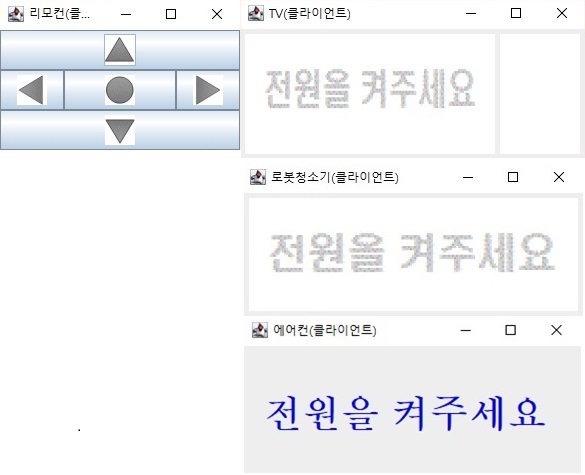
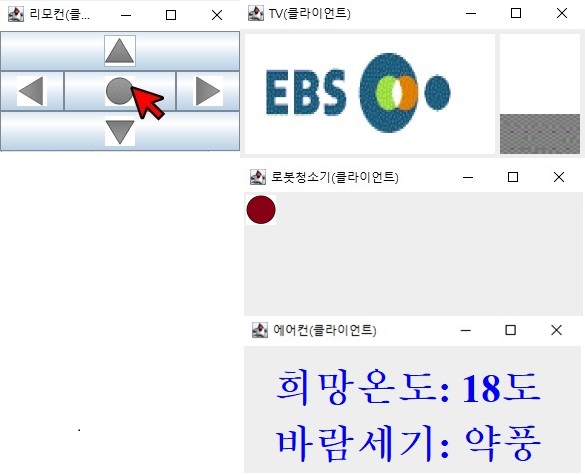
알고리즘
가전 네트워크 초기화
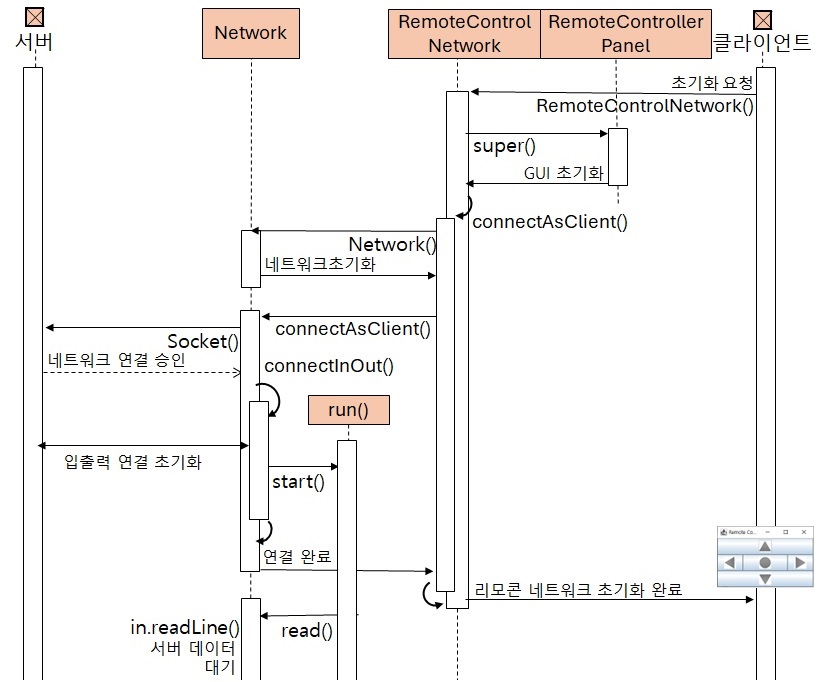
   네트워크 클라이언트 연결 초기화
      클라이언트에서 서버로 연결 요청
      네트워크 입출력 연결 후 데이터가 도착할 때까지 대기

리모컨 버튼 클릭시 가전제품에게 결과 전송
   리모컨 클릭 결과 확인
   상대편에게 네트워크로 데이터 전송

리모컨 클릭 결과 도착시 가전제품 상태 업데이트
   상대편이 네트워크로 보낸 데이터 읽기
   읽은 데이터를 바탕으로 가전제품 상태 업데이트

가전 네트워크 종료
   네트워크 종료
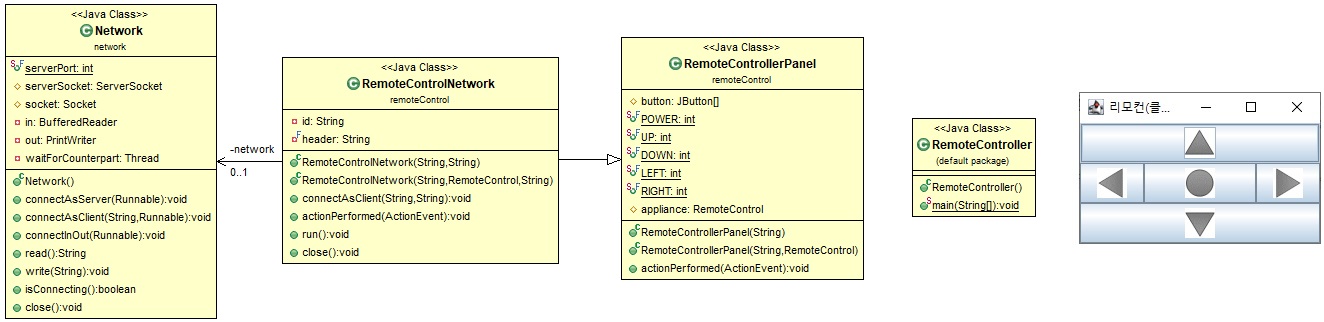
리모컨 클라이언트 프로그램의 GUI 및 클래스 다이어그램
리모컨 클라이언트 프로그램의 네트워크 연결 초기화 과정
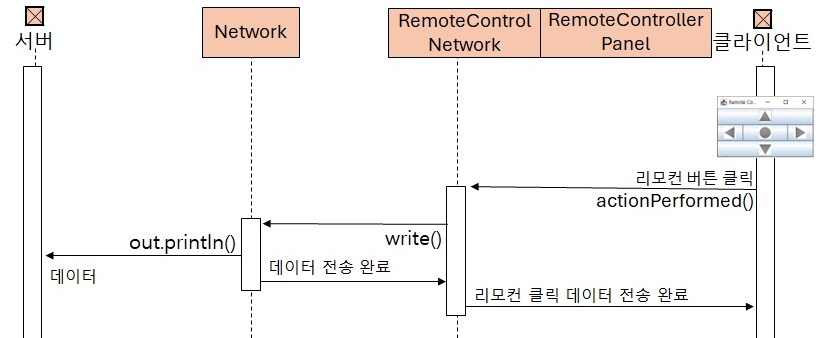
리모컨 클라이언트 프로그램의 클라이언트에서 서버로 데이터 전송 과정
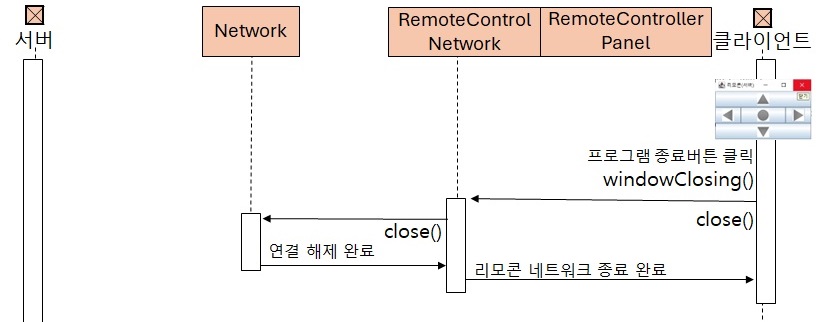
리모컨 클라이언트 프로그램의 네트워크 종료 과정
프로그램 코드
E001 // 클라이언트에서 연결 요청하면 서버는 네트워크 연결 초기화
E002 // 서버 데이터가 도착할 때까지 계속 대기
E003 // (수신전용스레드와 별개로) 메인 스레드 N41 이후 실행중
E004 // 버튼을 클릭할 때까지 계속 대기
E005 // 리모컨 전원버튼 클릭
E006 // 서버로 데이터([RMTC] [리모컨] POWER) 전송
E007 // 리모컨 우측버튼 클릭
E008 // 서버로 데이터([RMTC] [리모컨] RIGHT) 전송
E009 // 프로그램 종료버튼(우측상단 X) 클릭
E010 // 메인스레드와 수신전용스레드가 모두 종료하여 프로그램 종료
// 파일명 : ./Chapter18/RemoteController.java
import javax.swing.*;
import java.awt.event.*;
import remoteControl.RemoteControlNetwork;
// 리모컨으로 제어하는 리모컨 프로그램의 네트워크 클라이언트 버전
public class RemoteController
{
1 public static void main( String[] args ) {
final String imagePath = "C:\\Users\\user\\Downloads\\JAVA-main\\src\\remoteControl\\image\\";
String serverIP = "localhost";
2 RemoteControlNetwork panel =
3 new RemoteControlNetwork( imagePath, serverIP );
JFrame frame = new JFrame( "리모컨(클라이언트)" );
frame.getContentPane().add( panel );
frame.addWindowListener( new WindowAdapter() {
Wb public void windowClosing( WindowEvent event ) {
W1 panel.close();
We }
} );
frame.setDefaultCloseOperation( JFrame.EXIT_ON_CLOSE );
frame.pack();
frame.setVisible( true );
4 }
}
// 파일명 : ./src/remoteControl/RemoteControlNetwork.java
package remoteControl;
import java.awt.event.ActionEvent;
import network.Network;
// 리모컨 프로그램의 네트워크 담당 클래스
public class RemoteControlNetwork extends RemoteControllerPanel implements Runnable
{
private Network network;
private String id;
private final String header = "[RMTC] ";
// 가전 네트워크 초기화
// 리모컨 네트워크 초기화
RN1b public RemoteControlNetwork( String imgPath, String serverIP ) {
RN11 super( imgPath );
RN12 connectAsClient( serverIP, this.getClass().getSimpleName() );
RN1e }
// TV,로봇청소기,에어컨 네트워크 초기화
RN2b public RemoteControlNetwork( RemoteControl appliance, String serverIP ) {
RN21 super( appliance );
RN22 connectAsClient( serverIP, appliance.getClass().getSimpleName() );
RN2e }
// 네트워크 클라이언트 연결 초기화
RN3b public void connectAsClient( String serverIP, String applianceName ) {
id = "[" + applianceName +"]";
RN31 network =
RN32 new Network();
RN33 network.connectAsClient( serverIP, this );
RN3e }
// 리모컨 버튼 클릭시 가전제품에게 결과 전송
@Override
RN4b public void actionPerformed( ActionEvent event ) {
String message = "";
// 리모컨 클릭 결과 확인
if ( event.getSource() == button[POWER] )
message = header + "POWER";
else if ( event.getSource() == button[UP] )
message = header + "UP";
else if ( event.getSource() == button[DOWN] )
message = header + "DOWN";
else if ( event.getSource() == button[LEFT] )
message = header + "LEFT";
else if ( event.getSource() == button[RIGHT] )
message = header + "RIGHT";
// 상대편에게 네트워크로 리모컨 클릭 결과 전송
RN41 network.write( message );
RN4e }
// 리모컨 클릭 결과 도착시 가전제품 상태 업데이트
@Override
RN5b public void run(){
// 상대편이 네트워크로 보낸 데이터 읽기
RN51 for ( String message = null; ( message =
RN52 network.read() )
!= null; ) {
// 리모컨 프로그램 메시지가 아니면 무시
if ( !message.contains( header ) )
continue;
// 읽은 데이터를 바탕으로 가전제품 상태 업데이트
else if ( message.contains( "POWER" ) && ( appliance != null ) )
RN53 appliance.clickPower();
else if ( message.contains( "UP" ) && ( appliance != null ) )
RN54 appliance.clickUp();
else if ( message.contains( "DOWN" ) && ( appliance != null ) )
RN55 appliance.clickDown();
else if ( message.contains( "LEFT" ) && ( appliance != null ) )
RN56 appliance.clickLeft();
else if ( message.contains( "RIGHT" ) && ( appliance != null ) )
RN57 appliance.clickRight();
RN58 }
RN5e }
// 가전 네트워크 종료
RN6b public void close() {
network.write( header + id + " 네트워크 연결 종료" );
// 네트워크 종료
RN61 network.close();
RN6e }
}
// 파일명 : ./src/network/Network.java
package network;
import java.io.*;
import java.net.*;
// 네트워크 연결 및 입출력 클래스
public class Network
{
public static final int serverPort = 7700;
protected ServerSocket serverSocket;
protected Socket socket;
private BufferedReader in;
private PrintWriter out;
private Thread waitForCounterpart;
// 네트워크 클래스 초기화
N1b public Network() {
serverSocket = null;
socket = null;
in = null;
out = null;
waitForCounterpart = null;
N1e }
// 네트워크 서버 연결 초기화
N2b public void connectAsServer( Runnable obj ) {
try {
// 서버 소켓 연결
serverSocket = new ServerSocket( serverPort );
// 클라이언트에서 서버로 연결 요청시 연결 활성화
N21 socket =
N22 serverSocket.accept();
// 네트워크 입출력 연결 후 데이터가 도착할 때까지 대기
N23 connectInOut( obj );
} catch ( Exception e ) {
e.printStackTrace();
}
N2e }
// 네트워크 클라이언트 연결 초기화
N3b public void connectAsClient( String serverIP, Runnable obj ) {
try {
// 클라이언트에서 서버로 연결 요청
N31 socket =
N32 new Socket( serverIP, serverPort );
// 네트워크 입출력 연결 후 데이터가 도착할 때까지 대기
N33 connectInOut( obj );
} catch ( Exception e ) {
e.printStackTrace();
}
N3e }
// 네트워크 입출력 초기화
N4b public void connectInOut( Runnable obj ) {
try {
// 네트워크 입출력 연결
in = new BufferedReader( new InputStreamReader( socket.getInputStream() ));
out = new PrintWriter( socket.getOutputStream(), true );
// 네트워크에 데이터가 도착할 때까지 대기 시작
waitForCounterpart = new Thread( obj );
N41 waitForCounterpart.start();
} catch ( Exception e ) {
e.printStackTrace();
}
N4e }
// 상대편이 네트워크로 보낸 데이터 읽기
N5b public String read() {
try {
if ( this.isConnecting() == true )
N51 return
N52 in.readLine();
} catch ( Exception e ) {
e.printStackTrace();
}
return null;
N5e }
// 상대편에게 네트워크로 데이터 전송
N6b public void write( String data ) {
try {
if ( this.isConnecting() == true )
N61 out.println( data );
} catch ( Exception e ) {
e.printStackTrace();
}
N6e }
// 네트워크 연결 상태 확인
public boolean isConnecting() {
if ( ( socket != null )
&& ( in != null )
&& ( out != null )
&& ( waitForCounterpart != null )
&& ( waitForCounterpart.getState() != Thread.State.TERMINATED ) )
return true;
else
return false;
}
// 네트워크 종료
N7b public void close() {
try {
if ( waitForCounterpart != null ) {
waitForCounterpart.interrupt();
waitForCounterpart = null;
}
if ( in != null ) {
in.close();
in=null;
}
if ( out != null ) {
out.flush();
out.close();
out = null;
}
if ( socket != null ) {
socket.close();
socket = null;
}
if ( serverSocket != null ) {
serverSocket.close();
serverSocket = null;
}
} catch ( Exception e ) {
e.printStackTrace();
}
N7e }
}
// 파일명 : ./src/remoteControl/RemoteControllerPanel.java
package remoteControl;
import javax.swing.*;
import java.awt.*;
import java.awt.event.*;
// 리모컨 GUI 클래스
public class RemoteControllerPanel extends JPanel implements ActionListener
{
protected JButton[] button;
public final static int POWER = 0, UP = 1, DOWN = 2, LEFT = 3, RIGHT = 4;
// 리모컨으로 제어할 수 있는 가전제품 : TV, 에어컨, 로봇청소기
protected RemoteControl appliance;
// 리모컨 GUI 초기화
R1b public RemoteControllerPanel( String imgPath ) {
this.appliance = null;
// 리모컨 버튼의 이미지 및 리스너 초기화
final String[] strButton = { "power.gif", "up.gif", "down.gif", "left.gif", "right.gif" };
button = new JButton[strButton.length];
for ( int i = 0; i < strButton.length; i++ ) {
button[i] = new JButton( new ImageIcon( new ImageIcon( imgPath + strButton[i] ).getImage().getScaledInstance( 30, 30, Image.SCALE_SMOOTH ) ) );
button[i].addActionListener( this );
}
this.setPreferredSize( new Dimension( 240, 120 ) );
this.setLayout( new BorderLayout() );
this.add( button[POWER], BorderLayout.CENTER );
this.add( button[UP ], BorderLayout.NORTH );
this.add( button[DOWN ], BorderLayout.SOUTH );
this.add( button[LEFT ], BorderLayout.WEST );
this.add( button[RIGHT], BorderLayout.EAST );
R1e }
// 가전제품(TV, 로봇청소기, 에어컨)을 제어하는 리모컨 GUI 초기화
R2b public RemoteControllerPanel( String imgPath, RemoteControl appliance ) {
this( imgPath );
this.appliance = appliance;
R2e }
// 가전제품(TV, 로봇청소기, 에어컨)을 제어하는 리모컨 초기화
R3b public RemoteControllerPanel( RemoteControl appliance ) {
this.appliance = appliance;
R3e }
// 리모컨 버튼을 클릭시 가전제품 상태 업데이트
@Override
R4b public void actionPerformed( ActionEvent event ) {
if ( ( event.getSource() == button[POWER] ) && ( appliance != null ) )
appliance.clickPower();
else if ( ( event.getSource() == button[UP] ) && ( appliance != null ) )
appliance.clickUp();
else if ( ( event.getSource() == button[DOWN] ) && ( appliance != null ) )
appliance.clickDown();
else if ( ( event.getSource() == button[LEFT] ) && ( appliance != null ) )
appliance.clickLeft();
else if ( ( event.getSource() == button[RIGHT] ) && ( appliance != null ) )
appliance.clickRight();
R4e }
}
// 파일명 : ./src/remoteControl/RemoteControl.java
package remoteControl;
// 전원, 상, 하, 좌, 우 버튼이 있는 리모컨
public interface RemoteControl
{
boolean ON = true, OFF = false;
void clickPower();
void clickUp();
void clickDown();
void clickLeft();
void clickRight();
}
실행 순서
※ 실행순서 및 메모리상태는 A키(이전) 및 D키(다음)를 눌러도 확인할 수 있습니다